UCLA Moodle Workflow Analysis (using GIT)
Summary
Here at UCLA, the team that runs the main campus Moodle installation has decided to move to GIT from SVN. The primary motivation behind this move is that Moodle.org is moving to GIT. It makes sense for us to move because GIT is a distributed VCS, and it will make it easier to stay in sync with Moodle.org.
One hurdle that we are trying to overcome is how to fit GIT into our internal development workflow. As it stands now, SVN nicely fits into our workflow. Let me explain why.
In our workflow, we create feature branches to do most of our development. After the feature is completed, it gets “svn merged” into a develop/test branch. At any given time the resources we have doing testing and development fluctuate. There is no guarantee that the first feature merged into the develop branch will get tested first.
Finally, once a feature is tested, it gets “svn merged” into stage. Testing happens once again there, again in no given order. Once testing is completed on the feature it gets merged into the master, or trunk branch.
SVN merge works nicely because when you do the merge, you can choose either a specific revision, or a range of revisions.
Now onto GIT. GIT appears to work a bit differently. When you do a merge in GIT, you are merging the entire history of a branch up to the changeset specified. GIT does not support merges in the same way that SVN does. I’ve come up with a list of 5 options to accomplish the same, or similar thing in GIT.
Option 2 represents GIT’s equivalent to what we currently do in SVN, but I’m not looking to copy our SVN workflow just for the sake of keeping things the same. I want to do things the “right” way in GIT.
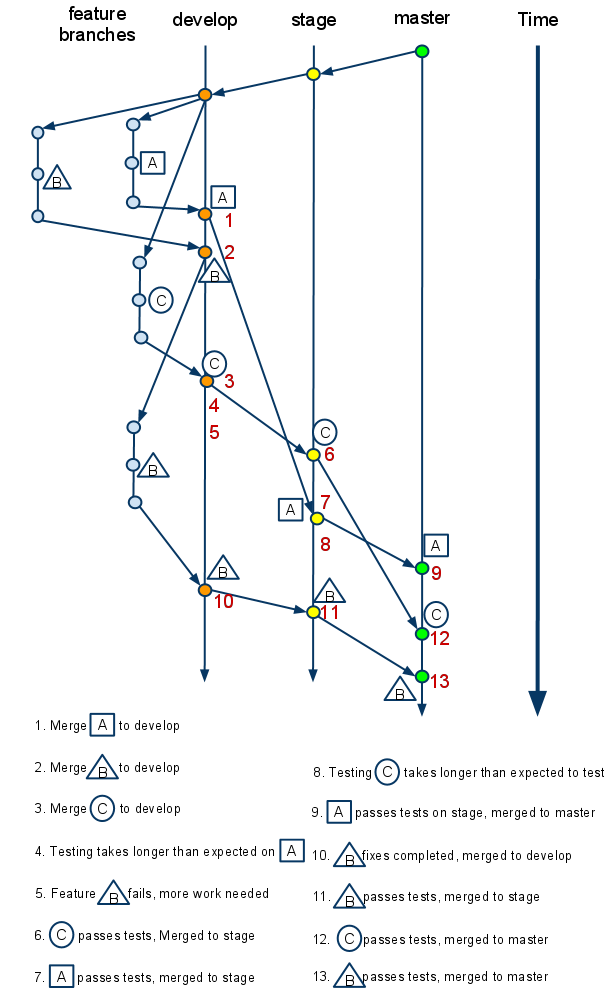
Proposed workflows to accomplish what is illustrated in the diagram:
Option 1
git merge from a feature branch to develop, then from feature branch to stage, and finally from feature branch to master as the feature graduates its way through the workflow.
What the history would look like on develop/stage/master:
*a37658bd merged in public/private| \| *a7785c10 another granular commit| *7f545188 added more text| *2bca593b added some text to a file|/Option 2
git merge —squash from the feature branch to develop. Subsequent merges can then be cherry-picked as the feature graduates its way through the workflow. This would be the GIT equivalent to SVN merges.
What the history would look like on develop/stage/master:
*4d4a0da8 merged …*a37658bd merged in public/private*d9484311 merged …Option 3
git merge cherry-pick each revision from the feature branch to develop. Then continue to use git cherry-pick to merge features to stage and master as they graduate through the workflow.
What the history would look like on develop/stage/master:
*4d4a0da8 did something else unrelated to the below code*a7785c10 another granular commit*7f545188 added more text*2bca593b added some text to a file*4d4a0da8 did another thing unrelated to the above codeOption 4
Do normal merges from feature branch to develop. Then to merge something to stage:
git branch tempbranch {last commit desired}git rebase --onto stage {earliest commit that you DON'T want included as part of the merge} tempbranch
What the history would look like on develop/stage/master:
*4d4a0da8 did something else unrelated to the below code*a7785c10 another granular commit*7f545188 added more text*2bca593b added some text to a file*4d4a0da8 did another thing unrelated to the above codeOption 5
Do normal merges from feature branch to develop. Then to merge something to stage:
git format-patch {earliest commit that you DON'T want included as part of the merge}..{last commit you want merged}git am *.patch
What the history would look like on develop/stage/master:
*4d4a0da8 did something else unrelated to the below code*a7785c10 another granular commit*7f545188 added more text*2bca593b added some text to a file*4d4a0da8 did another thing unrelated to the above codeNotes and observations
Option1
- Merges always originate from each feature branch
- Feature branches stick around in origin for a long time
Option2
- Squash all merges into a single commit.
- This is exactly how SVN behaves.
- Feature branches would have to stay around forever unless you are ok with losing all the history contained within them.
Option3
- Feature branches are merged like normal, then you do cherry-picks to merge features up as they graduate to the next branch.
- History is preserved in the first develop branch, but then gets lost in the subsequent branches.
- This would be come nearly impossible to manage as you are having to manually cherry pick potentially hundreds of commits each time a feature or two pass on one of the earlier branches.
Option4
- History of the branching is preserved on TEST
- Once things get merged to stage and master, all history gets flattened
- A little more complicated to perform basic merges than some of the other methods.
Option5
- Results in same history as option 4
- Little easier to use than option 4
Appendix: Full list of commands
Option 1 Option2 Option3 1.
- git checkout develop
- git merge A
- git branch -d A
- git push origin develop
- git checkout develop
- git merge —squash A
- git commit -m “merging feature A to develop”
- git branch -d A
- git push origin develop
- git checkout develop
- git merge A
- git branch -d A
- git push origin develop
2.
- git checkout develop
- git merge B
- git branch -d B
- git push origin develop
- git checkout develop
- git merge —squash B
- git commit -m “merging feature B to develop”
- git branch -d B
- git push origin develop
- git checkout develop
- git merge B
- git branch -d B
- git push origin develop
3.
- git checkout develop
- git merge C
- git branch -d C
- git push origin develop
- git checkout develop
- git merge —squash C
- git commit -m “merging feature C to develop”
- git branch -d C
- git push origin develop
- git checkout develop
- git merge C
- git branch -d C
- git push origin develop
5.
- git checkout develop
- git checkout B
start working on code
- git checkout develop
- git checkout B
start working on code
- git checkout develop
- git checkout B
start working on code
6.
- git checkout stage
- git merge C
- git push origin stage
- git checkout stage
- git cherry-pick {revision from 3}
- git commit -m “merging feature C to stage”
- git push origin stage
- git checkout stage
- git cherry-pick {revisions in C}
- git commit -m “merging feature C to stage”
- git push origin stage
7.
- git checkout stage
- git merge A
- git push origin stage
- git checkout stage
- git cherry-pick {revision from 1}
- git commit -m “merging feature A to stage”
- git push origin stage
- git checkout stage
- git cherry-pick {revisions in A}
- git commit -m “merging feature A to stage”
- git push origin stage
9.
- git checkout master
- git merge A
- git push origin master
- git push origin :A
- git checkout master
- git cherry-pick {revision from 7}
- git commit -m “merging feature A to master”
- git push origin master
- git checkout master
- ggit cherry-pick {revisions in A}
- git commit -m “merging feature A to master”
- git push origin master
10.
- git checkout develop
- git merge B
- git branch -d B
- git push origin develop
- git checkout develop
- git merge —squash B
- git commit -m “merging feature B to develop”
- git branch -d B
- git push origin develop
- git checkout develop
- git merge —squash B
- git commit -m “merging feature B to develop”
- git branch -d B
- git push origin develop
11.
- git checkout stage
- git merge B
- git push origin stage
- git checkout stage
- git cherry-pick {revision from 10}
- git commit -m “merging feature B to stage”
- git push origin stage
- git checkout stage
- git cherry-pick {revisions in B}
- git commit -m “merging feature B to stage”
- git push origin stage
12.
- git checkout master
- git merge C
- git push origin master
- git push origin :C
- git checkout master
- git cherry-pick {revision from 6}
- git commit -m “merging feature C to master”
- git push origin master
- git checkout master
- git cherry-pick {revisions in C}
- git commit -m “merging feature C to master”
- git push origin master
13.
- git checkout master
- git merge B
- git push origin master
- git push origin :B
- git checkout master
- git cherry-pick {revision from 11}
- git commit -m “merging feature C to master”
- git push origin master
- git checkout master
- git cherry-pick {revisions in B}
- git commit -m “merging feature C to master”
- git push origin master