How to Change your Domain Password on OS X El Capitan
This document provides a step-by-step set of instructions on how to change your expired domain password on a computer running OS X El Capitan. This password is used to log into departmental Windows computers and resources.
Your new password must meet password complexity standards as defined by your department.
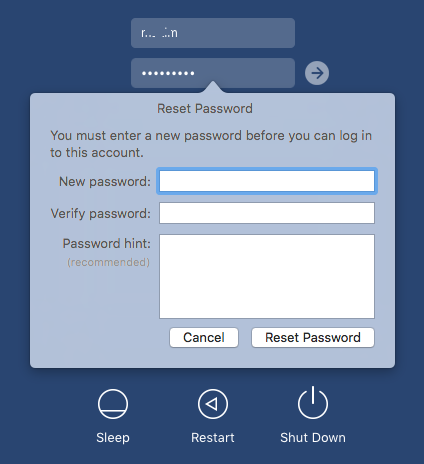
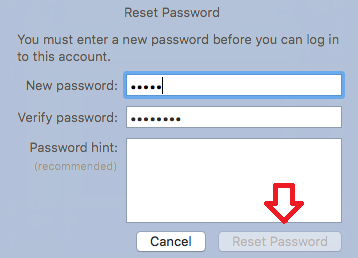
Upon logging on to your computer, you receive “Reset Password” dialog box. You are receiving this message because your domain password has expired. You must change the password before you can use your computer, you will be prompted to enter:
- The “New password” you want to set for your account (following IT’s standards for “Choosing a Good Password”)
- Retype your “New password” in the "Verify password” field
- You do not need to enter a password hint
- Then click “Reset Password” to apply the changes you have just made to your account.
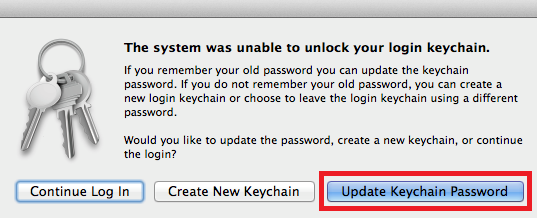
You will now be prompted to to update the OS X Keychain. Click “Update Keychain Password”.
When prompted, enter your previous password.
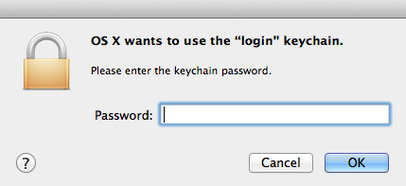
Click “OK”. Your domain password has now been changed and your OS X Keychain has been updated.
Common Errors:
- In order for the password change to be successful, you must ensure that what you are typing in the “New password” field matches your entry in the “Confirm password” field. If these entries do not match, you will not be able to click “Reset Password”.
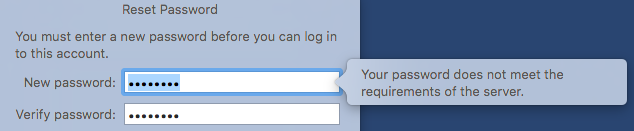
- Your new password MUST meet password standards. If your password does not meet minimum security standards, you will see the error below and your new password will not be accepted.