
How to Access ArcGIS Pro @ UCLA
UCLA Library information : https://guides.library.ucla.edu/geospatial/software-pr o
ArcGIS Pro can be downloaded or accessed via the UCLA Clicc Virtual Desktop
https://uclalibrary.atlassian.net/wiki/spaces/LITKB/pages/39138216/Access+a+CLICC+Virtual+Desktop
Note: If you log in your ArcGIS Online website https://gisucla.maps.arcgis.com/home/index.html at UCLA first and then open the ArcGIS Pro application, ArcGIS Pro will detect your account in ArcGIS Online and synchronize the account and log in. Then you can use ArcGIS Pro.
How To log into ArcGIS Pro Application:
Double click on the ArcGIS Pro Icon (on a virtual system, or if you installed it on your own PC)
When the ArcGIS sign in screen appears, click on the bottom portion "Your ArcGIS organiztion's URL"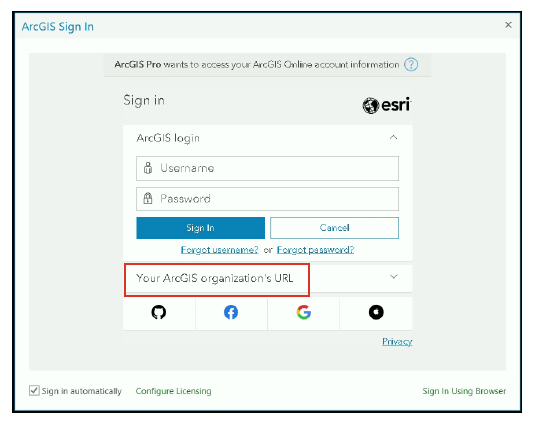
Type GISUCLA in the box and click on "remember this url". and click continue.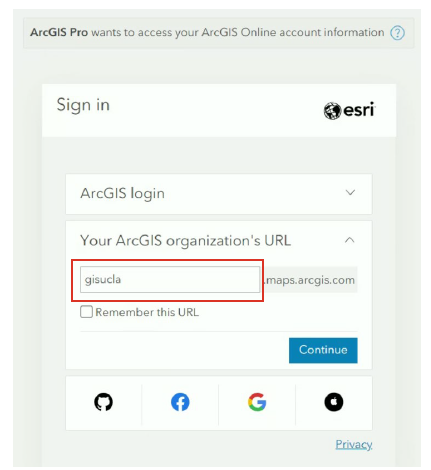
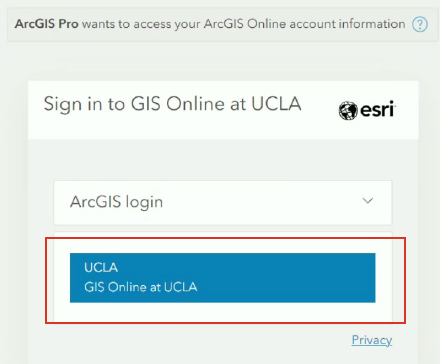
Now click on the UCLA SSO GIS Online at UCLA Blue box
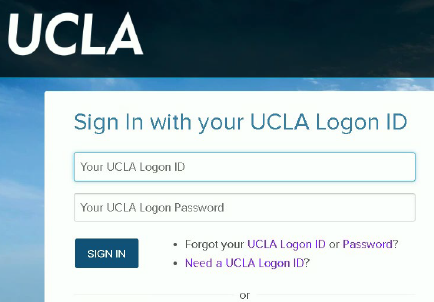
Sign in with your UCLA SSO credentials
Your ArcGIS Application will now start.